Customers with Items in Cart
You can track which of your customers have added products to their cart but have not yet converted them into an order from this screen. By clicking on the cart amount, you can view the relevant customer's cart, edit the items in it, or convert the cart directly into an order.
To access this tab; Admin Panel > Customers > Customers with Items in Cart
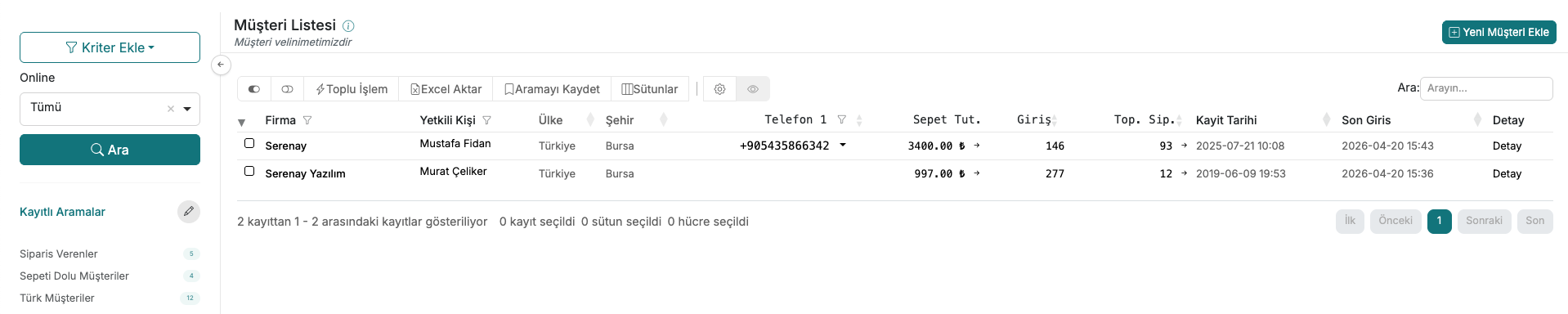
1. Listing Customers with Items in Cart
To view customers who have items in their cart, go to the Customers > Customers with Items in Cart menu from your admin panel.
The list screen displays information about customers who have items in their cart.
2. Viewing a Customer's Cart
To inspect a customer's cart, click the arrow icon next to the amount in the Cart Total column.
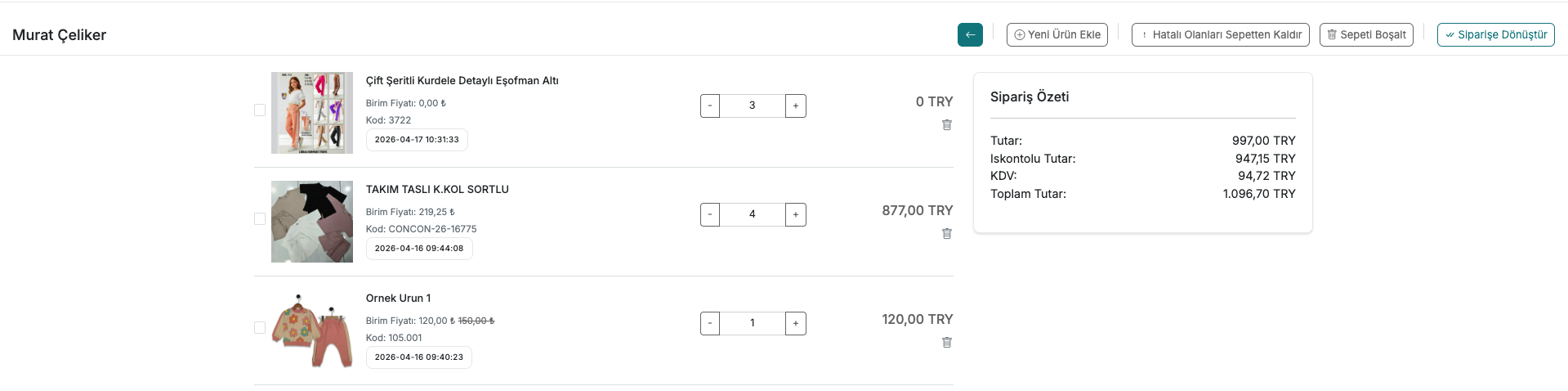
The cart detail page lists all the products the customer has added to their cart.
3. Performing Actions on the Cart
Using the buttons located in the top right corner of the cart detail page:
- Add New Product
- Remove Invalid Items from Cart
- Clear Cart
- Convert to Order
You can make changes to the cart by pressing these buttons.
Contact and Support
If you encounter any issues or need assistance, you can contact our support team. We will be happy to help you as soon as possible.