Profitability Reports
Profitability Reports allow you to examine your business's profitability performance in detail by product, brand, category, or customer. With these reports, you can easily identify profitable products or areas and make strategic decisions.
1. Where Can I Access It?
- You can access it from the Admin Panel > Orders tab.
Creating a Report
Follow the steps below to create a profitability report:

- Setting the Date Range: Enter the date range for the report you want in the
Start DateandEnd Datefields. - Brand: Select the brand whose report you want to view.
- Selecting the Report Type: Select the type of report you want to view from the
Report Typedropdown menu. The options are:- Profitability by Brand
- Profitability by Category
- Profitability by Customer
- Profitability by Product
- Viewing the Report: After making your selections, click the
Generate Reportbutton to view the report.

2. Evaluating Report Results
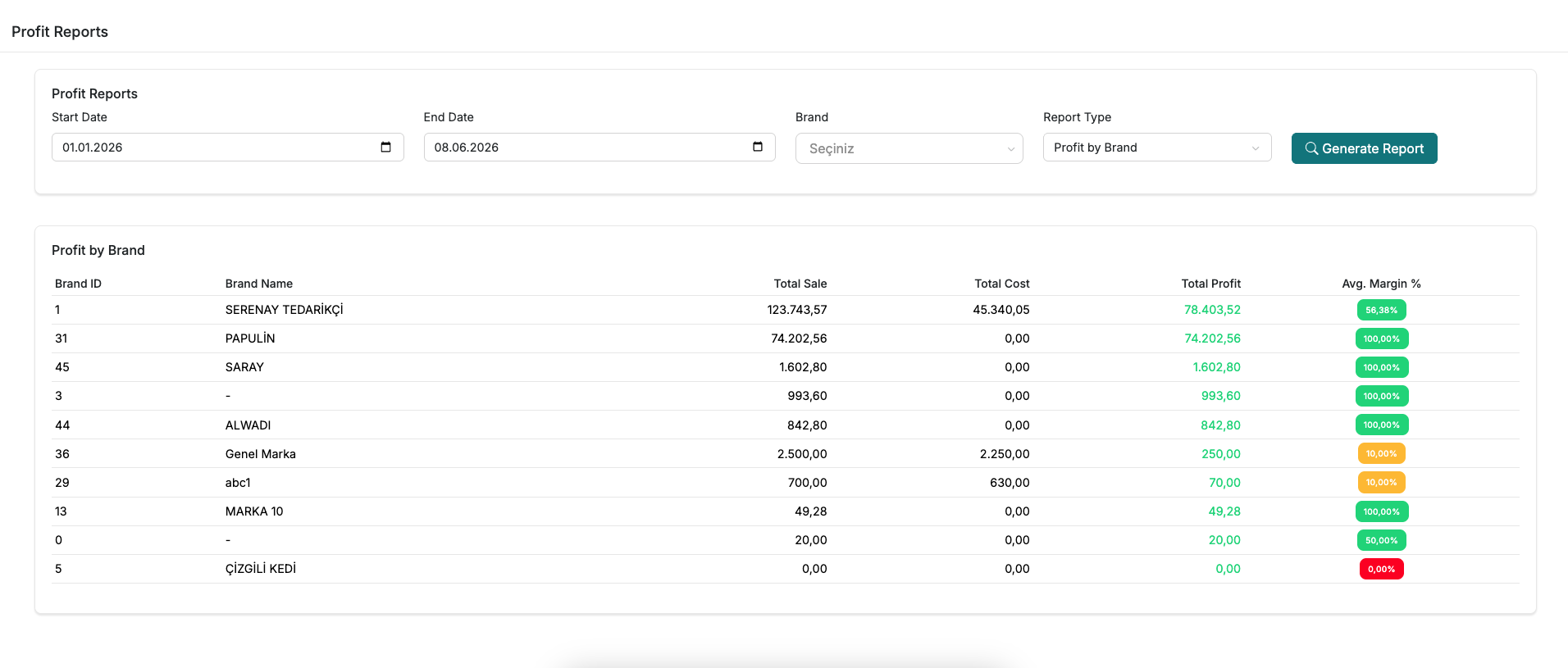
High-Performing Products: Products such as Product 4 and DONİNO that provide a high profit margin or total profit should be identified, and marketing and inventory management strategies should be focused on these products.
Examining Anomalous Data: Anomalous data, such as the KAPI BANDI product with a 100% margin, should be investigated to verify data accuracy.
Low Profitability Analysis: For products with low profitability, such as Mini Flower Dress, the cost-price balance should be reviewed, and if necessary, whether the product should remain in the portfolio should be evaluated.
Strategic Decision Making: The report allows for the evaluation of the effectiveness of overall pricing and cost management strategies by analyzing performance differences at the product level.
Support and Contact
For any questions or support requests, please contact us at [email protected].