Integrations
Integrations allows you to configure barcode, store, supplier, and other integration settings. It can be accessed from the serB2B admin panel under Settings > Integrations.
Settings
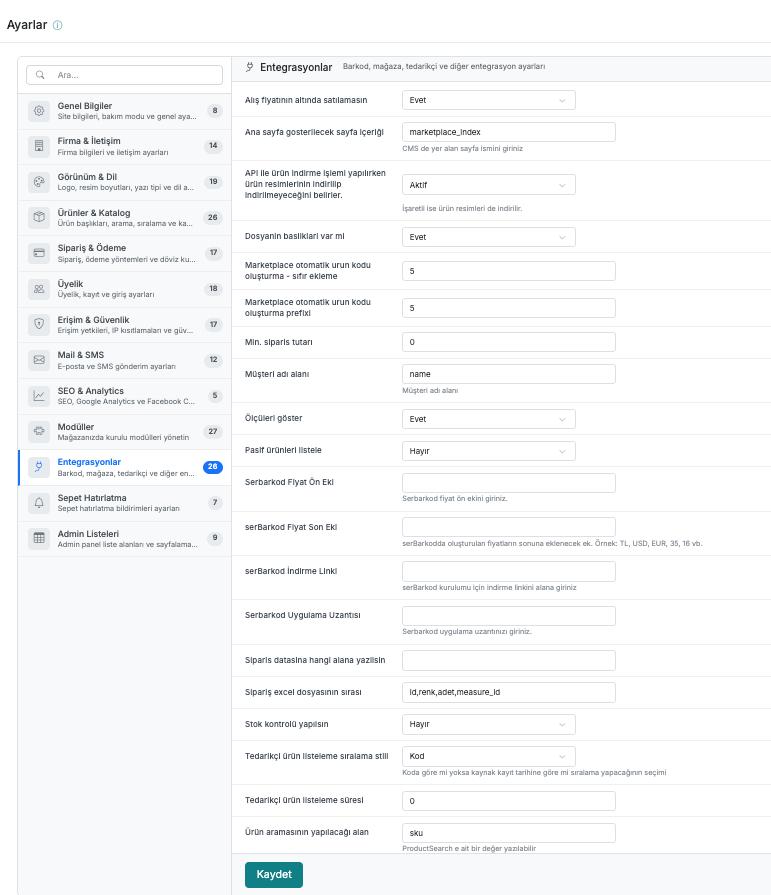
| # | Field | Description |
|---|---|---|
| 1 | Do not allow selling below purchase price | Prevents products from being sold below their purchase price. |
| 2 | Homepage content to display | The slug of the CMS page to be displayed on the homepage. (e.g. marketplace_index) |
| 3 | Determines whether product images are downloaded when downloading products via API | If checked, product images are also downloaded. |
| 4 | Does the file have headers? | Determines whether the import file contains a header row. |
| 5 | Marketplace automatic product code generation - zero padding | The number of zeros to prepend when generating automatic product codes. |
| 6 | Marketplace automatic product code generation prefix | The prefix to use when generating automatic product codes. |
| 7 | Min. order amount | Minimum order amount. If set to 0, no limit is applied. |
| 8 | Customer name field | The field to be used for the customer name. (e.g. name) |
| 9 | Show measurements | Determines whether product measurements are displayed. |
| 10 | List inactive products | Determines whether inactive products are listed. |
| 11 | serBarkod Price Prefix | The prefix to be added before prices generated through serBarkod. |
| 12 | serBarkod Price Suffix | The suffix to be added after prices generated through serBarkod. (e.g. TL, USD, EUR) |
| 13 | serBarkod Download Link | The download link for serBarkod installation. |
| 14 | serBarkod Application Extension | Enter the serBarkod application extension. |
| 15 | Which field should the order data be written to | The field where the order data will be written. |
| 16 | Order Excel file column order | The column order in the order Excel export. (e.g. id,renk,adet,measure_id) |
| 17 | Perform stock control | Determines whether stock control is performed during ordering. |
| 18 | Supplier product listing sort style | Selection of whether supplier products are sorted by code or by source record date in the listing. |
| 19 | Supplier product listing duration | The duration for which supplier products remain in the list. |
| 20 | Field to use for product search | The field to be used for product searching. (e.g. sku) A sub-value can be entered for ProductSearch. |