Products & Catalog
Products & Catalog allows you to configure product titles, search, sorting, and catalog settings. It can be accessed from the serB2B admin panel under Settings > Products & Catalog.
Settings
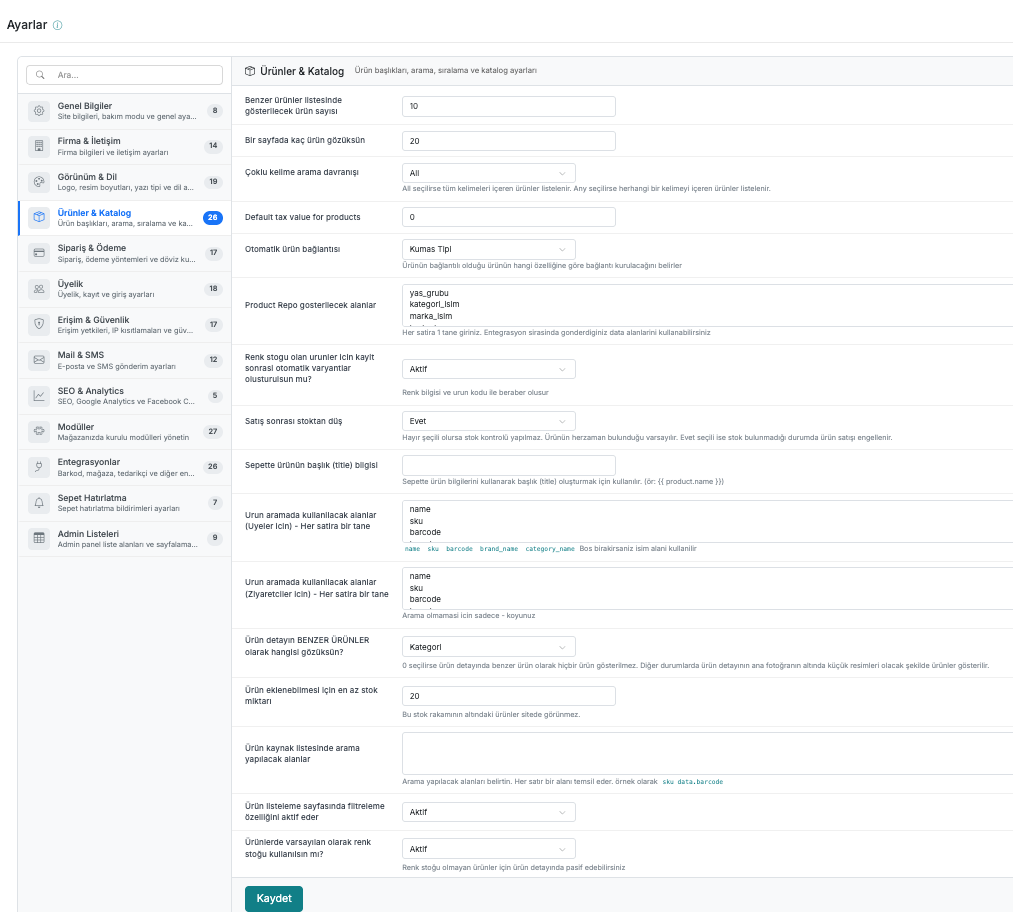
| # | Field | Description |
|---|---|---|
| 1 | Number of products to show in the similar products list | The number of similar products to display on the product detail page. |
| 2 | How many products per page | The number of products to display per page on listing pages. |
| 3 | Multi-word search behavior | If "All" is selected, only products containing all keywords are listed. If "Any" is selected, products containing any of the keywords are listed. |
| 4 | Default tax value for products | The default tax value for products. |
| 5 | Automatic product linking | Determines which property of the linked product is used to establish the connection. |
| 6 | Fields to display in Product Repo | Data fields sent during integration. Enter one per line. (e.g. yas_grubu, kategori_isim, marka_isim) |
| 7 | Should automatic variants be created after saving for products with color stock? | Created together with color information and product code. |
| 8 | Deduct from stock after sale | If "No" is selected, stock control is not performed. If "Yes" is selected, product sales are blocked when stock is unavailable. |
| 9 | Product title (title) in cart | Used to generate a title using product information in the cart. (e.g. {{ product.name }}) |
| 10 | Fields to use for product search (For Members) — One per line | Fields that members can search by. (e.g. name, sku, barcode) If left blank, the name field is used. |
| 11 | Fields to use for product search (For Visitors) — One per line | Fields that visitors can search by. To disable search, enter only -. |
| 12 | Which should appear as SIMILAR PRODUCTS on the product detail page? | Determines the criterion by which similar products are listed on the product detail page. If 0 is selected, no similar products are shown. |
| 13 | Minimum stock quantity required to add a product | Products with stock below this number will not appear on the site. |
| 14 | Fields to search in the product source list | Specifies the fields to be searched. Each line represents one field. (e.g. sku, data.barcode) |
| 15 | Activates the filtering feature on the product listing page | Determines whether the filter panel is shown on the listing page. |
| 16 | Should color stock be used by default for products? | For products without color stock, this can be disabled on the product detail page. |