Stock Movements
Track product movements across all warehouses from a single screen. Every type of movement — stock entries, transfer outflows, and transfer inflows — is recorded here. You can see which product entered which warehouse and when, which warehouse it left, and the previous and subsequent stock quantities.
To access this page; Admin Panel > Warehouse Management > Stock Movements
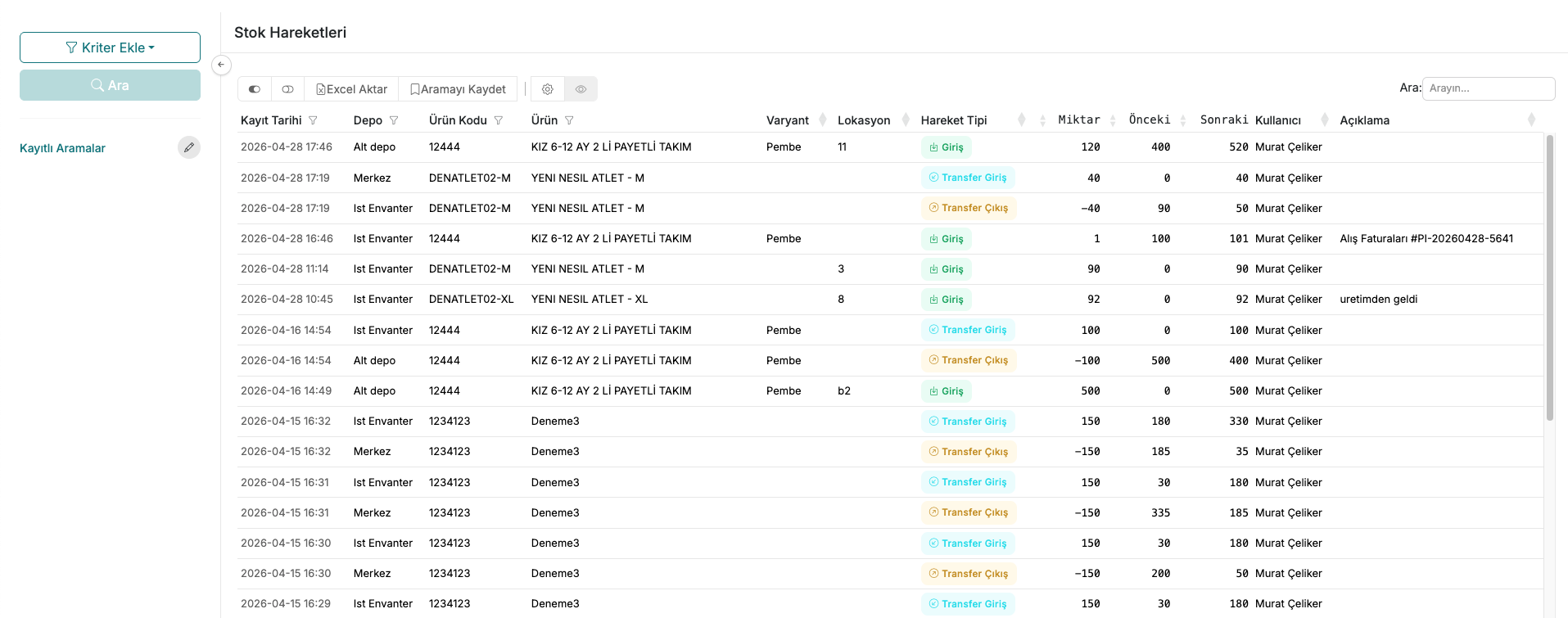
The list displays the record date, warehouse, product code, product name, variant, location, movement type, quantity, previous stock, current stock, user, and description for each movement.
Movement types are as follows:
- Entry — stock entry into the warehouse via a physical count or purchase invoice
- Transfer In — stock increase resulting from a transfer received from another warehouse
- Transfer Out — stock decrease resulting from a transfer sent to another warehouse
Contact and Support
If you encounter any issues or need assistance, you can contact our support team. We will be happy to help you as soon as possible.