Marketing Pixels
You want to measure whether your Facebook and Google ads are actually converting into sales. Without knowing which ad drove add-to-carts or which campaign drove purchases, you can't manage your budget correctly.
With Marketing Pixels, you can define the Facebook Conversions API and Google Tag Manager integrations for your store. Visitor behavior and purchase data are then automatically sent to the relevant ad platforms, allowing you to accurately measure and optimize your ad performance.
To access this tab; Admin Panel > Settings > SEO & Analytics
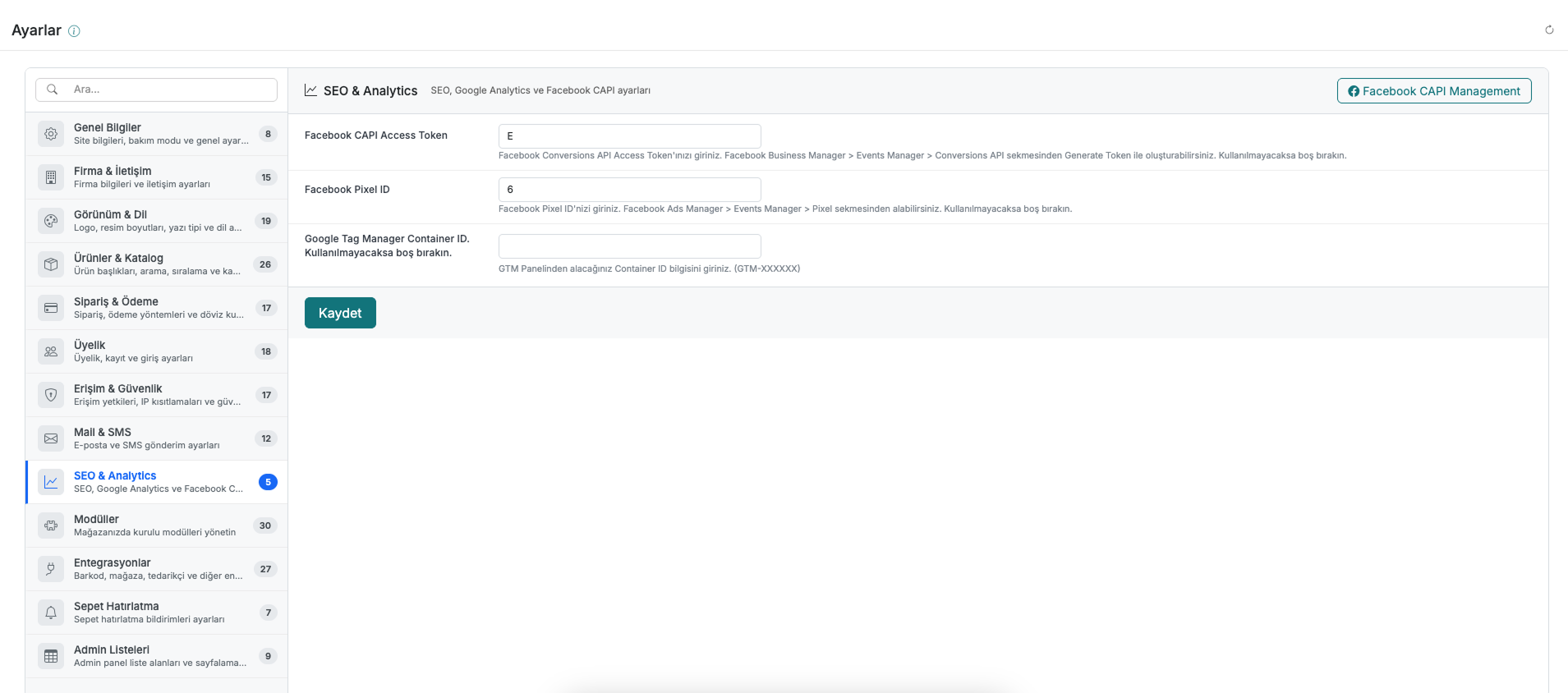
1. Facebook CAPI Access Token
Enter your Access Token here to send conversion data to Facebook via the Conversions API.
You can generate the token from Facebook Business Manager > Events Manager > Conversions API using "Generate Token". Leave it blank if you won't be using it.
2. Facebook Pixel ID
Enter your Facebook Pixel ID here.
You can find your Pixel ID under Facebook Ads Manager > Events Manager > Pixel. Leave it blank if you won't be using it.
3. Google Tag Manager Container ID
Enter the Container ID you get from the Google Tag Manager panel here. (e.g., GTM-XXXXXX)
Leave it blank if you won't be using it.
4. Facebook CAPI Management
Click the "Facebook CAPI Management" button in the top-right corner of the page to manage your Facebook Conversions API integration in detail.
Don't forget to click "Save" after filling in the fields.
Contact and Support
If you encounter any issues or need assistance, feel free to contact our support team. We are happy to help you as soon as possible.