Authorization
The Authority module in the serB2B system allows you to define user access levels and admin privileges in detail. This ensures better system control while enhancing both security and user experience.
Purpose of the Module
- Define access restrictions for members, guests, and admin users
- Enhance security with IP protection and session duration settings
- Create a controlled structure by managing who can access what information
- Manage permissions for data export, viewing, and operational actions
Main Settings and Descriptions
Go to Settings > Authority in your serB2B admin panel to review and configure the settings.
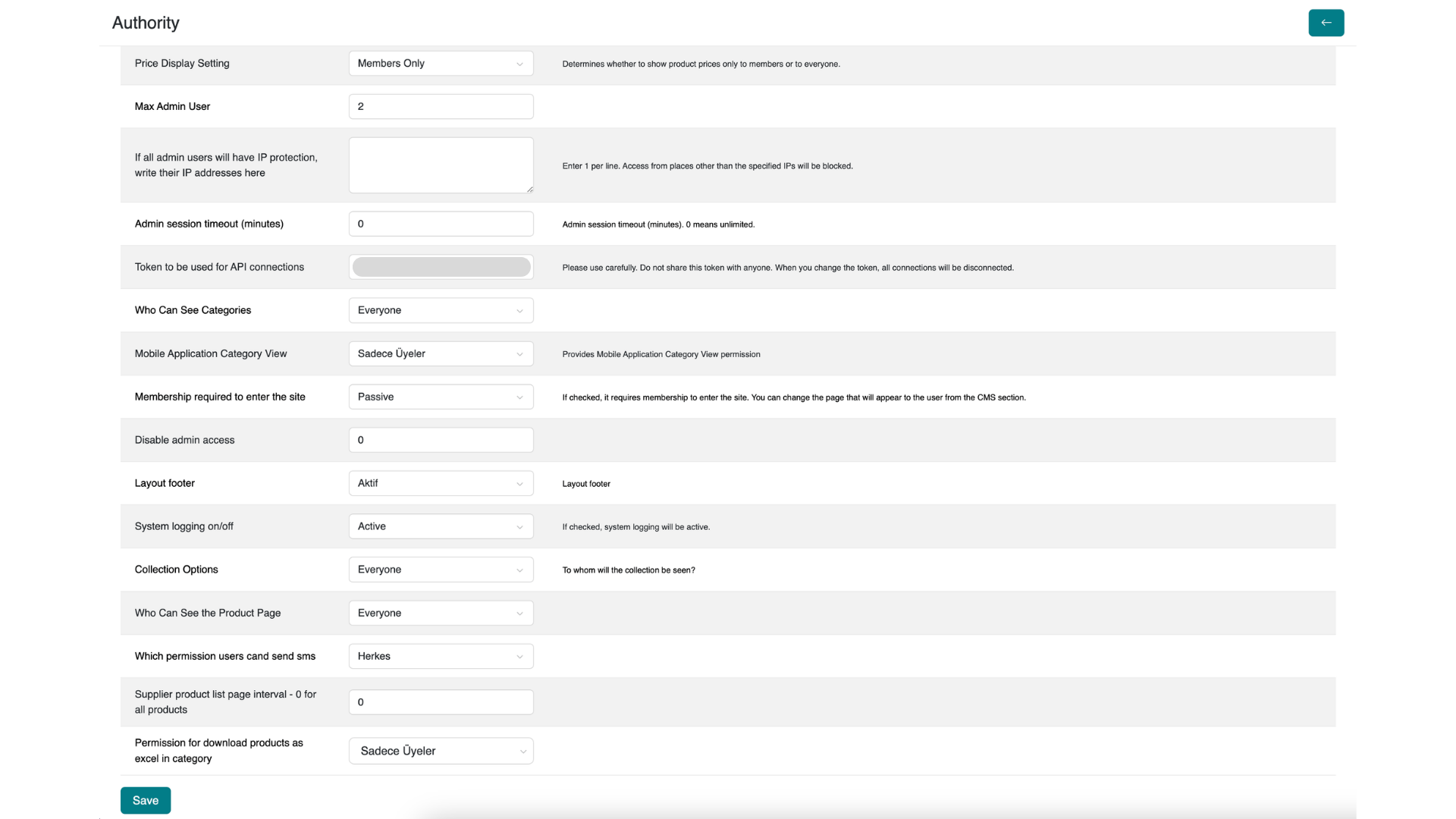
1. Price Display Setting
Who can view product prices?
Options: Members Only / Everyone
2. Maximum Number of Admins
Maximum number of admin users that can be defined in the system at the same time.
Input Type: Numeric
3. IP Restriction (Admin)
Restricts admin logins to specific IP addresses.
Note: Enter one IP address per line.
4. Admin Session Timeout
Duration an admin session remains active.
Input Type: Minutes (0 = unlimited)
5. API Token
Used for API connections with external systems.
Warning: If changed, all connections will be invalidated. Keep it secure.
6. Category Visibility
Permission to view categories from website.
Options: Members Only / Everyone
7. Mobile App Category View
Permission to view categories from mobile devices.
Options: Members Only / Everyone
8. Membership Requirement (Site Access)
You can make membership mandatory for accessing the site.
Options: Active / Passive
9. Disable Admin Panel Access
Ability to completely disable access to the admin panel.
Input Type: 1 (disabled) / 0 (enabled)
10. Layout Footer Display
Enable or disable the display of the page footer section.
Options: Active / Passive
11. System Logging
Whether system activities will be logged.
Options: Active / Passive
12. Collection Options
Permission to view collection payment options. Options: Hidden / Everyone / Members Only
13. Product Page Visibility
Permission to view product details.
Options: Members Only / Everyone
14. Order SMS Sending Authority
Permission to send SMS after order completion.
Options: Everyone / Master Authority Only
15. Supplier Product Listing Duration
How long supplier products remain listed (e.g., in days)
Input Type: Numeric
16. Excel Download Authority
Permission for users to export data to Excel.
Options: Members Only / Members and Guests / No
Saving and Applying Changes
Changes will take effect immediately after clicking the "Save" button at the bottom of the page.
Frequently Asked Questions (FAQ)
- What is an API Token and why is it important?
An API Token is used to securely connect external systems with serB2B. It must be stored safely and not shared.
- What happens when IP protection is enabled?
Only authorized IP addresses will be able to access the admin panel, increasing security.
- Who should be granted Excel export authority?
It is generally recommended to grant this authority only to members to protect data security.
Resources
Support and Contact
For any questions or support requests, please contact our support team.